Showing posts with label android. Show all posts


Some interesting smartphone-related terminologies

ခုနောက်ပိုင်းထွက်တဲ့ ဖုန်းတွေရဲ့ spec ကိုလိုက်ဖတ်ရင်း ကိုယ်မသိသေးတဲ့/စိတ်ဝင်စားဖို့ကောင်းတဲ့ terminology လေးတွေအကြောင်း လိုက်ရှာဖတ်ပြီး အတိုချုံး ပြန်ရေးလိုက်ပါတယ်။

1. MHL vs. SlimPort®

mobile device+adapter+external display = extended experience

− MHL နဲ့ SlimPort နှစ်ခုလုံးက မိုဘိုင်းဖုန်း ရဲ့ microUSB ကနေ ပြင်ပ display မျက်နှာပြင်တစ်ခုခုနဲ့ audio/video ချိတ်ဆက်သုံးလို့ရတဲ့ နည်းပညာတွေ ဖြစ်ပါတယ်။

− အရင်ထွက်ပြီးသား Android ဖုန်းတော်တော်များများမှာ MHL ပါပြီးတော့ Nexus 4, Nexus 5 နဲ့ Nexus 7, Asus Padphone လောက်ဘဲ SlimPort နဲ့ ထုတ်ထားတာရှိသေးတယ်။ (List of MHL-ready phones၊ List of SlimPort devices )

− MHL ကို HDMI devices တွေနဲ့ဘဲ ချိတ်ဆက်အသုံးပြုနိုင်ပါတယ်။ အဲဒါတောင်မှ HDTV နဲ့ချိတ်မယ်ဆိုရင် MHL-certified HDMI input ရှိတဲ့ တီဗီမျိုးမှ ရမယ်လို့ ဆိုပါတယ်။ SlimPort ကိုတော့ HDMI, VGA, DVIA, DisplayPort အားလုံးနဲ့ ချိတ်ဆက်သုံးလို့ ရပါတယ်။

− MHL adapter တွေက external power လိုပြီး SlimPort က မလိုပါဘူး။ MHL 2.0 နောက်ပိုင်းမှာ external power သပ်သပ် မလိုတော့ပေမယ့် main device ကနေ ပါဝါတော်တော်စားသေးတယ်လို့ သိရတယ်။

- SlimPort ရဲ့ speed က MHL ထက် ၂ဆလောက် ပိုမြန်တယ်။ SlimPort က Full HD ကို support လုပ်တယ်။  

-  MHL ကော Slimport ရော Android phone/tablet တွေကနေ Adapter နဲ့ display ကိုချိတ်တဲ့အခါ ဒေါင်လိုက်မရဘဲ အလျားလိုက် တစ်ခုဘဲရတာကိုတော့ သိပ်သဘောမကျပါဘူး။ application တွေကို demo လုပ်ရ အဆင်မပြေတော့ဘူး။ ဂိမ်းဆော့ ရုပ်ရှင်ကြည့်လောက်ဘဲ အဆင်ပြေမယ်။ video ရော audio ရော ချိတ်ဆက်သုံးလို့ရတာဆိုတော့ Surround Sound speaker တွေရှိရင်တော့ တော်တော်မိုက်မယ်။ 

 
video: Slimport In Action

SlimPort က သုံးရပိုအဆင်ပြေတယ်လို့ ကောက်ချက်ချလို့ရပေမယ့် သူ့နည်းပညာက free မဟုတ်တော့ နောက်ပိုင်းလည်း devices များများ ထပ်ထွက်ဖို့တော့ မရှိလောက်သေးဘူး။ MHL ကတော့ လူသုံးပိုများတဲ့ စံနှုန်းဖြစ်နေသေးတယ်။ MHL 3.0 မှာလည်း တော်တော်တိုးတက်လာတော့ နောက်ပိုင်းဆို SlimPort နည်းပညာကို မှီလာမလားဆိုတာ စောင့်ကြည့်ရပါဦးမယ်။

ကိုးကား −
- http://blog.clove.co.uk/2012/11/02/what-is-slimport/
- http://www.slimportconnect.com/

- http://www.meetmhl.com/index.aspx

2. Gorilla Glass

Gorilla Glass က US ကုမ္ပဏီ Corning Inc. ရဲ့ နည်းပညာဖြစ်ပြီး ပြုတ်ကျရင်တော်ရုံမကွဲ၊ ဖိအား တော်တော်ပြင်းတာကိုခံနိုင်ပြီး၊ တော်ရုံခြစ်ရာမထင်တဲ့ မှန်တစ်မျိုးတဲ့။ ခုနောက်ပိုင်းထွက်တဲ့ ဖုန်းတော်တော်များများ Corning Gorilla Glass နဲ့ ထုတ်လာကြတယ်။ ပိုက်ဆံတစ်အားပေါတဲ့သူတွေ drop test, scratch test လုပ်ထားတာ youtube မှာ အများကြီးဘဲ။ ကားနဲ့တက်ကြိတ်တဲ့သူတောင်ရှိသေး။ :D အဲလိုပေါက်တတ်ကရလုပ်ရင်တော့ screen အောက်က display ကတော့ ပျက်စီးသွားတတ်တယ်။ မှန်ကတော့ မကွဲဘူး။ ခြစ်ရာလည်း တော်ရုံမထင်ဘူး။ အမှန်ဆို gorilla glass နဲ့ဖုန်းတွေက screen protector တောင်မလိုဘူး။ ဒါပေမယ့် ဖုန်းအသစ်ဝယ်ရင် screen protector ကပ်ရမယ်ဆိုတာကြီး အရိုးစွဲနေတော့ ကပ်လိုက်ရမှ ကျေနပ်တယ်။ :D

3. Dragontrail Glass
Dragontrail Glass ကြတော့ ဂျပန်ကုမ္ပဏီတစ်ခုက ထုတ်တာ။ သူလဲ တော်ရုံခြစ်ရာမထင်ဘူး၊ တော်ရုံကျရင် မကွဲတဲ့ မှန်မျိုးပေါ့။ Gorilla glass လောက်တော့ မမာဘူးထင်တယ်။ Sony Xperia Z1 တို့ Galaxy Nexus တို့က Dragontrail Glass နဲ့ ထုတ်ထားတာ။ 

4. Oleophobic coating
Oleophobic ဆိုတာ ဂရိစာလုံးဖြစ်ပြီး "Afraid of oil" လို့ အဓိပ္ပါယ်ရတယ်။ ဖုန်း screen တွေမှာ လက်ဗွေရာ သိပ်မထင်အောင် Oleophobic Coating ထည့်ကြတယ်။ အဲဒီ coating ပါတာ ခုထိတော့ iphone, ipod, ipad တွေလောက်ဘဲ ရှိသေးတယ်။ car wax polish တွေဖြန်းပြီး Oleophobic coating DIY လုပ်တဲ့သူတွေလည်း ရှိတယ်။

5. Smartphone Sensors
စမတ်ဖုန်းတွေမှာ အခု sensor ပေါင်းစုံပါလာတယ်။ Accelerometer က orientation အတွက်၊ gyroscope က ဂိမ်းကစားဖို့အတွက်ထည့်ထားတာ။ barometer ပါလာတာ ထူးဆန်းတယ်။ GPS က latitude, longitude, altitude နဲ့ 3-dimension တွက်ရတော့ အြမင့်ကို တွက်ဖို့အတွက် barometer တွေထည့်ထားတာတဲ့။ လေဖိအားရော တိုင်းလို့ရမလားမသိဘူး။ Galaxy S4 နဲ့ Note 3 မှာဆိုရင် temperature sensor, humidity sensor တွေတောင်ပါတယ်။ နောက်ဆို ဖုန်းတွေမှာ ဘာ sensor တွေ ထပ်ပါလာဦးမလဲမသိ။   

6. GLONASS
GLONASS ဆိုတာ ရုရှားကနေ navigation အတွက်သုံးဖို့ လွှင့်တင်ထားတဲ့ ဂြိုလ်တုစနစ်။ ဂြိုလ်တုပေါင်း ၂၄ခု လွှင့်တင်ထားပြီး ရုရှားအတွက် သုံးဖို့ အဓိကဖြစ်တဲ့အတွက် ကမ္ဘာ့မြောက်ဘက်ခြမ်းမှာသုံးရင် ပိုတိကျတဲ့အဖြေကို ရတယ်တဲ့။ GLONASS ကို support လုပ်တဲ့ ပထမဆုံး smartphone က iPhone 4s တဲ့။ ခုနောက်ပိုင်း ၂၀၁၃မှာထွက်တဲ့ ဖုန်းတော်တော်များများရယ်၊ Garmin device အသစ်တွေရယ်က GPS ရော GLONASS ရော ၂မျိုးလုံး support လုပ်တယ်။ GPS တစ်မျိုးတည်းသုံးတဲ့ ဖုန်းတွေထက် ၂၀ရာခိုင်နှုန်း ပိုတိကျတဲ့ positioning ရတယ်လို့ ဆိုပါတယ်။ ၂ခုလုံးကို support လုပ်တော့ turn-by-turn navigation သုံးရတာ ပိုအဆင်ပြေလာတယ်။ EU ကလည်း Galileo လို့ အမည်ရတဲ့ ဂြိုလ်တုစနစ်ကို ၂၀၁၄မှာ သုံးနိုင်အောင် ပြင်ဆင်နေပါတယ်။ တရုတ်ပြည်ကလည်း Compass Navigation System  ဆိုပြီး ဂြိုလ်တု ၃၅လုံးလွှင့်တင်ထားပြီး GPS ထက် ပိုပြီးကောင်းမွန်တဲ့ဝန်ဆောင်မှုပေးနိုင်ဖို့ ကြိုးစားနေတယ်တဲ့။ GLONASS ကို support လုပ်မလုပ်က processor/chipset နဲ့ဆိုင်တာ။ ခုနောက်ပိုင်းထွက်တဲ့ snapdragon processor တွေအကုန် GLONASS ကို support လုပ်တယ်တဲ့။

ကိုးကား − 
− http://thetecnica.com/2013/02/what-is-glonass-in-mobile-phones
- GPS and GLONASS: "Dual-core" Location For Your Phone


A first look at Android 4.4(Kitkat) and Nexus 5

Nexus 5
Android ဖုန်းဆိုရင် Nexus ဖုန်းမှ ဖုန်းထင်လို့ အြမင်ကပ်တဲ့လူတွေလည်း ကပ်လောက်ပြီ။ :D Nexus 4 ထွက်တုန်းက ဖုန်းအဟောင်း က ကောင်းနေသေးတာရယ်၊ Android 4.2 နဲ့ 4.3 ကို OTA update ရတာရယ်တို့ကြောင့် အသစ်မလဲဖြစ်ဘူး။ ခုက Galaxy Nexus ကို kitkat update မပေးတော့ဘူးလို့ ပြောကြတာကြောင့် ဖုန်းအသစ်ဝယ်ဖို့လိုလာတယ်။ Galaxy Nexus က ဝယ်ထားတာ ၂နှစ်နီးနီးရှိတော့မယ်ဆိုပေမယ့် ဘက်ထရီ performance နည်းနည်းကျသွားတာကလွဲရင် ကျန်တာ အကုန် ကောင်းနေသေးတယ်။ Nexus 5 ထွက်တော့ ဝယ်ဖို့လိုက်ကြည့်နေတာ နည်းနည်းကြာသွားတယ်။ Nexus ဖုန်းတွေက ခုထိ ဆိုင်တွေမှာ တင်ရောင်းတဲ့ဖုန်း ဖြစ်မလာသေးဘူး။ Samsung ကထုတ်တုန်းကတောင် မနည်းရှာရတာ၊ LG ကထုတ်တော့ ပိုဆိုးသွားတယ်။ Techbug ကနေ pre-order လုပ်ပေးပေမယ့် ပိုက်ဆံပေးထားပြီး တစ်လလောက်ကြီး မစောင့်ချင်ဘူး။ နောက်ဆုံးမှ Lelong ကနေ DirectD ဆိုတဲ့ ဆိုင်ကို သွားတွေ့တယ်။ online ကနေမှာရင် warranty claim တွေ၊ screen protector ကပ်ရတာတွေ အလုပ်ရှုပ်လို့ အဲဆိုင်ထိသွားလိုက်တယ်။ အဲဒီဖုန်းဆိုင်က Subang Jaya SS15 မှာ၊ ဆိုင်တော်တော်ကြီးတယ်။ ဖုန်းကို Wholesale ရောင်းတာ ဒီတစ်ဆိုင်ဘဲ ရောက်ဖူးသေးတယ်။ လူတွေ ကြိတ်ကြိတ်တိုးဘဲ။ သူက စျေးမတင်ထားတော့ ကုမ္ပဏီစျေးဆိုပြီး ဆိုစျေးအတိုင်း တစ်ပြားမှ မလျှော့ပေးဘူး။ စျေးတော့ တကယ်မှန်တယ်နေမယ်။ လူတွေတိုးပြီး ဖုန်းဝယ်နေကြတာများ အအေးဆိုင်မှာ အအေးမှာနေသလိုဘဲ။ တန်းစီပြီး ငါ့ကို ဘယ်ဖုန်းပေးဆိုရင် ဖုန်းထုတ်လာတယ်။ ငွေချေရုံဘဲ။ အခြားဆိုင်တွေလို စျေးဆစ်ရစရာမလိုတော့ မိုက်တယ်။ ခုနောက်ပိုင်း lenovo ဖုန်းတွေ တော်တော်ခေတ်စားလာပုံရတယ်။ တန်းစီနေတုန်း ကိုယ့်ရှေ့မှာတင် lenovo ဖုန်း အလုံး ၂၀လောက် ရောင်းထွက်သွားတယ်။ 

Nexus 5 က အဖြူရောင်နဲ့ အနက်ရောင် ၂မျိုးလာတော့ ဘယ်ဟာယူရမလဲ တော်တော်စဉ်းစားလိုက်ရတယ်။ နောက်ဆုံး အနက်ရောင်ဘဲ ယူဖြစ်တယ်။ အနက်က အဖြူထက် ရင်းဂစ်၄၀လောက်တော့ ပိုပေးရတယ်။ အဲလိုဆိုတော့ အဖြူက ချို့ယွင်းချက်တစ်ခုခုရှိလိမ့်မယ်လို့ ကောက်ချက်ချလိုက်တာ။ :D nexus 5 ရဲ့ back cover အသားက လက်ဗွေရာ တစ်အားထင်တယ်။ အဖြူရောင်သာယူလိုက်ရင် တော်တော်ညစ်ပါတ်လွယ်မယ်ထင်တယ်။ အနက်ရောင်ယူလိုက်လို့တော်သေးတယ်။ 16GB ဘဲယူတာက ဖုန်းထဲမှာ သီချင်းတွေ ရုပ်ရှင်တွေ သိပ်ထည့်လေ့မရှိတော့ အရင်ဖုန်းတုန်းကဆို usage က 10GB တောင်မကျော်ဘူး။ ပြီးတော့ ဂိမ်းဆော့ရင်လည်း တစ်ခုဆို တစ်ခု မရပ်မနားဆော့ပြီး ပျင်းသွားမှ အခြားတစ်ခု ကစားတာဆိုတော့ uninstall လုပ်ထားတာ များတယ်။ နောက်ဆုံး nexus 5 16GB ကို RM1525 နဲ့ ဝယ်လိုက်တယ်။ online ကနေမှာရင် စျေးနည်းနည်း ပိုသက်သာပေမယ့် ရောက်နေမှတော့ မထူးဘူးဆိုပြီး ဝယ်ခဲ့လိုက်တယ်။ 

ဖုန်းဆိုင်က ကောင်မလေးက sim card ကို ဖြတ်ပေးတာ ၂ခြမ်းကျိုးသွားလို့ maxis center မှာ ကဒ်အသစ်သွားထုတ်ရသေးတယ်။ micro sim အတွက် 25ကျပ် ပေးလိုက်ရတယ်။ 

Nexus 5 က 130g ဆိုတော့ တော်တော်ပေါ့တယ်။ Galaxy Nexus(4.64 inch), Nexus 4 (4.7 inch) နဲ့စာရင် သူက 4.95 inch ဆိုပေမယ့် သိသိသာသာတော့ ကြီးမလာဘူး။ Display က 445ppi ဆိုတော့ screen တော်တော်ကြည်တယ်။

Android 4.4 (kitkat) 
 ဒီပို့စ်မှာ သာမန် user တစ်ယောက် ရှုဒေါင့်ကနေဘဲ သတိထားမိသလောက် ရေးလိုက်မယ်။ SDK ပိုင်းမှာ ပြောင်းသွားတာတွေကို နောက်ပို့စ်တစ်ခုမှ ထပ်ရေးတော့မယ်။

၁။ Developer options: အရင် Android တွေအတိုင်းဘဲ Setting -> About phone ကနေ Android Version ကို သုံးချက်လောက် tap ရင် Easter egg ထွက်လာတယ်။ Developer Option လိုချင်ရင် Build number ကို ၇ချက် tap လုပ်ရတယ်။ 

၂။ Look and Feel: Kitkat ဗားရှင်းမှာ စာလုံးတွေ၊ background တွေကို အဖြူရောင်အစား နည်းနည်းဖျော့တဲ့ မီးခိုးရောင်ဆန်ဆန်အဖြူကို သုံးထားတာကြောင့် သုံးရတာ easy-on-eye ပိုဖြစ်တယ်။ 

၃။ Messaging app ကို Hangouts က replace လုပ်သွားတယ်။ sms နဲ့ gtalk message တွေရောသွားတာ အလွန် စိတ်ရှုပ်ဖို့ကောင်းတယ်။ 3rd party messaging app တစ်ခု မဖြစ်မနေ သုံးကို သုံးရမယ်ဖြစ်သွားတာ။ အရင်က GoSMS ကိုသဘောကျပေမယ့် ခုနောက်ပိုင်း Ads ထည့်လာတော့ annoying ဖြစ်လို့ အခု ရိုးရိုးရှင်းရှင်း Chomp SMS ကို ပြောင်းသုံးနေတယ်။ 

၄။ Browser: အရင် Android တွေမှာပါတဲ့ Stock (AOSP) browser ပါမလာတော့ဘူး။ အစက တော်တော် upset ဖြစ်မိပေမယ့် Chrome နဲ့အစားထိုးလိုက်တယ်။ Kitkat အတွက် customize လုပ်ထားသလားတော့မသိဘူး။ အရင် Android 4.3 ပေါ်မှာထက်တော့ ပိုသုံးလို့ကောင်းတယ်။ 

၅။ Phone Dialer:  အရင်ဗားရှင်းတွေမှာ Contacts နဲ့ Dial app က သပ်သပ်ပေမယ့် ခု Kitkat မှာ ပေါင်းလိုက်တယ်။ ဖုန်းနံပါတ်နှိပ်ရတာ၊ Contacts ရှာရတာ ပိုပြီး smooth ဖြစ်လာတယ်။ 

၆။ Keyboard မှာ comma ကိုနေရာပြောင်းလိုက်လို့ စစချင်း စာရိုက်ရ နည်းနည်းခက်သွားသေးတယ်။ :D Gesture typing ကတော့ ပိုပြီးတော့ smooth ဖြစ်လာတယ်။

၇။ Settings မှာ “Tap n pay” နဲ့ “Cloud Printing” ဆိုပြီး ပိုလာတယ်။ Tap n Pay က NFC payment အတွက်ဖြစ်မယ်။

၈။ Speaker:  အောက်ဘက်က microusb port ဘေးမှာ speaker ၂ခုထည့်ထားတော့ အရင်ဖုန်းတွေထက်တော့ အသံနည်းနည်းပိုကျယ်လာတယ်။ 

၉။ Gmail app: အရင်တုန်းက attach picture, attach video ဘဲရတာ။ အခု attach file ဆိုပြီး Google Drive က ဖိုင်တွေပါ ရွေးဖို့ option ပါလာတယ်။ 

၁၀။ Quick Office app ဆိုပြီးပါလာတယ်။ Word, excel, powerpoint တွေဖွင့်လို့ရတယ်။ create လုပ်လို့ရတယ်။

၁၁။ Myanmar Unicode support
Chrome မှ မြန်မာယူနီကုဒ် နှင့် Facebook app မှ ဇော်ဂျီဖောင့်

အရေးအကြီးဆုံးကို မေ့နေတယ်။ :D ဘာဖောင့်မှသွင်းစရာမလိုဘဲ မြန်မာယူနီကုဒ်တွေဖတ်လို့ရသွားပြီ။ Default ဆိုရင် ဇော်ဂျီဖောင့်တွေ ဂဂျိုးဂဂျောင်ဖြစ်ကုန်တယ်။ သို့ပေမယ့် First Myanmar Browser လိုမျိုး app နဲ့ ဇော်ဂျီကို ကောင်းကောင်းဖတ်လို့ရသေးတယ်ဆိုတော့ လူတွေ ဇော်ဂျီကို ပစ်ပြီး ယူနီကုဒ် လုံးလုံးပြောင်းသုံးကြဖို့တော့ မျှော်လင့်ချက် သိပ်မရှိသေးဘူး။ Android 4.3 မှာ ဇော်ဂျီ ဖောင့်တွေ order မမှန်ဖြစ်သွားပေမယ့် 4.4 မှာ ပြန်အိုကေသွားတယ်။ ဇော်ဂျီကို font embed လုပ်ထားရင် ပြဿနာ မရှိတော့ဘူး။ ရပင့် နဲ့ အသတ်ဘဲ နည်းနည်းလေး နေရာရွေ့နေတာ။

၁၂။ Low power audio playback: နာရီ ၆၀ အထိ သီချင်းနားထောင်လို့ရမယ်ဆိုတော့ ခရီးသွားရင် တော်တော်အသုံးဝင်သွားပြီ။ 

၁၃။ Share to Google Drive

ဘယ် app ကနေဖြစ်ဖြစ် share ကိုနှိပ်လိုက်ရင် Google Drive ကို ရွေးစရာပါလာတယ်။ အထူးသဖြင့်ဖုန်းထဲကပုံတွေကို ကွန်ပျူတာထဲရွှေ့ဖို့ usb မလိုတော့ဘူး။ ဖုန်းထဲကပုံကို Google Drive ပေါ်တန်းပို့ တော်တော်အဆင်ပြေတယ်။ 

Miscellaneous 
Android Device Manager 
ကိုယ့်ရဲ့ gmail အကောင့်နဲ့ ဝင်ထားတဲ့ ဖုန်းအကုန်လုံးကို အဝေးကနေ monitor လုပ်လို့ရတယ်။ ring လို့ရတယ်။ Lock လုပ်လို့ရတယ်။ ဒေတာလည်း ဖျက်လို့ရတယ်။ gmail password တော့ အခိုးမခံရစေနဲ့ပေါ့နော်။ ဖုန်းတစ်လုံးလုံးပါသွားဦးမယ်။ 

နောက်ပို့စ်မှ Developer ရှုဒေါင့်ကနေ Android 4.4 SDK အကြောင်း ရေးပါဦးမယ်။ :)


Google I/O 2013: keynote recap

Google ရဲ့ နှစ်စဉ် conference တစ်ခုဖြစ်တဲ့ Google I/O 2013 ကို ပြီးခဲ့တဲ့ မေလ ၁၅−၁၇ ရက်နေ့မှာ ပြုလုပ်သွားတယ်။ ဒီနှစ်က ဂူဂယ်လ်ရဲ့ ခြောက်ကြိမ်မြောက် conference ပေါ့။ သူ့conference မှာ Google ကနေ လက်ရှိလုပ်နေတဲ့ ပရောဂျက်တွေ၊ နောက် ဆက်လုပ်သွားဖို့ရှိတဲ့ ပရောဂျက်တွေ၊ အရေးကြီး ကြေငြာချက်တွေအကြောင်း ပြောလေ့ရှိတော့ Developers တွေအဖို့ နှစ်စဉ်မပြတ် စောင့်ကြည့်ရတဲ့ conference တစ်ခုပါ။ Google ထုံးစံအတိုင်း keynote မှာ သူ့ employee တွေထဲကနေ လူမျိုးပေါင်းစုံအောင် ပွဲထုတ်ပါတယ်။ ဒီနှစ် keynot မှာ Google ကိုစတင်တည်ထောင်သူတွေထဲက တစ်ယောက်ဖြစ်တဲ့ Larry Page ထွက်လာတာကတော့ ထူးခြားမှုတစ်ခုပါ။ 
Google I/O 2013 ရဲ့ keynote က သုံးနာရီကျော်ကြာတော့ အကျဉ်းချုံးပြန်ရေးဖို့ သုံးခါလောက် ပြန်ကြည့်လိုက်ရတယ်။ သူကြေငြာသွားတာတွေထဲက စိတ်ဝင်စားဖို့ကောင်းတဲ့ အချက်တွေကို ပြန်ရေးရရင် 

၁။ Google Play Services 
1. Google Maps Android API v2 
- apps တွေထဲမှာ 3D maps ထည့်လို့ရလာတော့မယ်။ 

2. Location API 
- Fused location provider (GPS တစ်ခုတည်းကနေမဟုတ်ဘဲ location ကို GSM နဲ့ wifi ကနေပါ ရနိုင်တော့မယ်။ power consumption နိမ့်တယ်လို့ အာမခံထားတယ်။) 
- Geofencing (find virtual fences, up to 100 geo fences per app
-  Activity Recognition (walking, cycling, cars) accelerometer+machine learning classifier (battery efficient way)

3. Google+ sign in with cross-platform single sign-on
web site တစ်ခုမှာ Google+ နဲ့ sign in ထားရင် အဲဒီweb မှာ app ရှိရင် တစ်ခါတည်း install လုပ်လို့ရ, ပြီးရင် ဖုန်း/tablet မှာ ချက်ချင်း sign in လုပ်ပေး။

4. Google Cloud Messaging 

(အရင်နှစ်က push msg အတွက်ဘဲ ကြေငြာခဲ့တယ်။) ဒီနှစ် features သုံးခု အသစ်ထပ်ဖြည့်ထားတယ်။  - - Persistent connection
- Upstream messaging (ဖုန်းကနေ ဆာဗာကိုပြန်ပို့)
- Synchronize notification on different devices 


5. Google Play game services (also for iOS and web) 
- Cloud save (save user data across devices) 
- Achievments 
- Leaderboards (Google+ circle to connect players) public leaderboard, friends leaderboard 

Google+ circle ထဲမှာရှိတဲ့သူငယ်ချင်းတွေကို ဖိတ်ပြီး head-to-head raceကစားလို့ရမယ်။ Android,iOS and web သုံးခုလုံးအတွက်ဆိုတော့ cross-platform gaming experience ရတာပေါ့။ 

၂။ Android Studio 

 IntelliJ IDEA ကို ပြန်ပြင်ထားတာ။ Eclipseထက် သာတယ်လို့ပြောလို့ရတဲ့ Features တွေကတော့ 

- know deep semantic model of your code
- xml ထဲက string တွေ icon တွေ အရောင်တွေကို ချက်ချင်း အလွယ်တကူ preview လို့ရတယ် 
- layout LIVE rendering on different screen sizes တပြိုင်တည်းကြည့်လို့ရ 
- Internalization: layout with different language ကို တပြိုင်တည်းကြည့်လို့ရ။ 
- GCM API ကို အလွယ်တကူ add လို့ရ၊ နောက်ထပ် အခြား Android API တွေကို လွယ်လွယ် သုံးလို့ရအောင်လုပ်သွားဖို့ရှိ။ 

Early access preview ကို http://developer.android.com/sdk/installing/studio.html ကနေ ဒေါင်းလုတ်လုပ်လို့ရပါပြီ။

၃။ Google Play Developer Console မှာ အသစ်ပါလာမယ့် features တွေ 
- Optimization tips ( သင့်ရဲ့ app ကို ဘယ်လိုနည်းလမ်းတွေနဲ့ improve လုပ်နိုင်မလဲဆိုတာ အကြံပေးထားတယ်။) 
- App Translation Tips (Google Play console ထဲကနေဘဲ ကိုယ်လိုချင်တဲ့ language ကို ဘာသာပြန်ပေးဖို့ professional translator ငှားလို့ရ။)  
- Referral Tracking (Google Analytics)  
- Usage Metrics (analytics ထဲသွားကြည့်စရာမလို google play console ထဲမှာ တစ်ခါတည်းကြည့်နိုင် 
- Revenue Graphs  
- Beta testing and staged rollouts (apk တင်တဲ့အခါ beta testing, alpha testing, production အတွက် သပ်သပ်စီ တင်လို့ရတယ်။) 


၄။ Galaxy S4 running Jelly Bean 


ခါတိုင်းဆို အမြဲတမ်း Nexus device တစ်ခုခု ကြေငြာတတ်တယ်။ ဒီနှစ်တော့ လောလောဆယ် Nexus ဖုန်းထပ်ထုတ်ဖို့ မရှိသေးလို့နေမယ်။ Galaxy S4 ကို TouchWiz မပါဘဲ stock Jelly Bean နဲ့ ထုတ်ပေးမယ်လို့ ပြောသွားတယ်။ S4 16GB, bootloader unlocked ကို ဂျွန်၂၆ ကနေ စပြီး $649 နဲ့ ရောင်းမယ်ဆိုတော့ သိပ်တော့ မတန်ဘူး။ $550 လောက်နဲ့ရောင်းရင် ဟုတ်သေးတယ်။ 

၅။ Webp and VP6 (image & video compression) 

WebP က image တွေကို ချုံ့ဖို့ open-source, loyalty free compression Technology၊ သူက lostless/lossy compression, transparency, color profile, meta data, animated images အကုန်လုံးကို support လုပ်မယ်ဆိုတော့ jpg, png, animated gif တွေကို အစားထိုးသွားနိုင်မယ်လို့ ပြောသွားတယ်။ 

Video compression codec (vp9)VP9 ကတော့ အရင်နှစ်က ကြေငြာသွားတဲ့ ဗီဒီယို format webM အတွက် next generation codec - မူရင်းကွာလတီအတိုင်း ဖိုင်ဆိုဒ်ကို ၅၀%ထိ လျှော့ချပေးနိုင်မယ်။ ဒီနှစ်ကုန်ပိုင်းလောက်မှာ youtube က VP9 ကို support လုပ်ဖို့ရှိတယ်။ - chrome for mobile browser app မှာလည်း vp9 ကို data compression proxy အဖြစ် အသုံးပြုသွားမယ်လို့ပြောတယ်။ 

၆။ shopping from phone (using chrome) 

ကွန်ပျူတာသုံးပြီး အင်တာနက်ကနေ စျေးဝယ်တာ တွင်ကျယ်ပေမယ့် လက်ကိုင်ဖုန်းကနေ shopping လုပ်တာ ဘာကြောင့်မတွင်ကျယ်သေးသလဲဆိုရင် ပုံမှန် checkout process တစ်ခုက အဆင့်ပေါင်း ၂၁ဆင့်လောက်ထိ ရှိလို့တဲ့။ မကြာခင် Chrome ကိုသုံးပြီး အဆင့်သုံးဆင့်ထဲနဲ့ checkout လုပ်နိုင်တော့မယ်။  
1. checkout button  
2. review billing & shipping (credit card info ကို Google+ အကောင့်နဲ့သိမ်းထားလို့ auto-fill) 
3. submit 

၇။ built your own HTML tags 

developer တွေ ကိုယ်ပိုင် HTML tags တွေ CSS tag တွေ createလုပ်နိုင်ပြီး components အဖြစ်စုထားပြီးတော့ အခြား ပရောဂျက်တွေမှာ ပြန်သုံးလို့ရမယ့် IDE တစ်ခုလုပ်နေတယ် ကြေငြာသွားတယ်။ သေချာတော့မပြောသွားဘူး။ အသေးစိတ်သိအောင် web components and actions section ကို ကြည့်ရမယ်။ 

၈။ Google Play for Education (pilot) 

app license တွေအများကြီးတစ်ခါတည်းဝယ်ပြီး student device ထဲတစ်ခါတည်း install လို့ရတဲ့ service။ US က ကျောင်းတွေမှာ pilot run နေတုန်း။ 

၉။ Google + 

Google+ မှာ အဓိက feature တွေဖြစ်တဲ့ stream, hangouts, photo သုံးခုကို Vic Gundotra က ပြောသွားတယ်။ speaker တွေထဲမှာ သူ့ကို အကြိုက်ဆုံးဘဲ။ Google+ က facebook ကိုကြည့်ပြီး facebook ကမပေးတဲ့ service တွေ လိုက်ဖြည့်နေပုံဘဲ။ FB ကိုကျော်ပြီး next-generation social networking ဆိုဒ်တစ်ခု ဖြစ်လာမလားဆိုတာတော့ စောင့်ကြည့်ရမယ်။ G+ ရဲ့ tagline “Live, Learn and Love” ဆိုတာကို သဘောကျတယ်။ 

1. Stream with Design & Depth   
-stream က ပို့စ်တွေကို Single column သို့ multi-column ရွေးလို့ရတယ်။ 
- Fast, fluid and fun  
- စာမျက်နှာသေကြီး မဖြစ်နေအောင် animations (flip, in/out) တွေထည့်ထားတယ်။ 
- related hashtags (ကိုယ်ပို့စ်တစ်ခုတင်လိုက်ရင် Google+ က အော်တို tag ပေးတယ်။) အဲဒီ tag ကို click လိုက်ရင် အခြား ဆက်စပ်မှုရှိတဲ့ ပို့စ်တွေကို တစ်ခုချင်း လိုက်ဖတ်လို့ရတယ်။  
- ဓါတ်ပုံတင်ထားရင် automatically hashtag landmarks - image analysis+knowledge graph 


2. Hangouts   
- gtalk ကို replace လုပ်ဖို့ ရည်ရွယ်ထားတော့ ဖုန်းတွေမှာ Hangout ကိုသွင်းလိုက်ရင် gtalk တစ်ခါတည်းပျောက်သွားရော။   
- တစ်ယောက်ချင်းစီ သို့မဟုတ် ကိုယ့် circle တစ်ခုလုံးနဲ့ စကားဝိုင်းစလို့ရတယ်။ ဓာတ်ပုံ၊ ဗီဒီယို အကုန် တင်လို့ရတယ်။ group video chat လည်း အခမဲ့ ပြောလို့ရမယ်။ 


3. Photos   
- Backup လုပ်လို့ရမယ်။ 15GB free (full size), standard size (unlimited)   
- Google+ ပေါ်တင်ပြီးတာနဲ့ Edit လုပ်လို့ရမယ်။skin softening, noise reduction, while balance, vingnette, sharpening, red-eye removal, စသဖြင့်။   
- collage, HDR, smile, motion, pano ဆိုတဲ့ Auto-awesome effects ငါးခုကိုလည်း ထည့်ထားပေးတယ်။ တော်တော်မိုက်တယ်။

၁၀။ Google Search   
- Knowledge graph အတွက် အင်္ဂလိပ်အပြင် ပိုလန်၊တူရကီ၊ တရုတ်(simplified) နဲ့ တရုတ်(traditional) စတဲ့ ဘာသာစကားလေးခုကို အသစ်ထည့်သွင်းထားတယ်။
- Conversational search - အရင်က ဖုန်းမှာဘဲရတာ။ Chrome OC, Chrome for PC/Mac/Linux။ ”ok Google”ဆိုပြီး မေးချင်တာ မေးသွားရုံဘဲ။ ”ok Google.. ဟိုဟာရှာပေးပါ။ ဒီဟာရှာပေးပါ။” :D 
- Google Now − Android 4.1 ကနေ စပြီးပါလာတဲ့ feature, reminders, public transit, TV shows, albums & books စတာတွေကို ထပ်ဖြည့်ထားတယ်။ 

၁၁။ Google Maps 

(Base Maps + Street View + Imagery + Local Data)
လမ်းညွှန်ဖို့အတွက်ချည်းမဟုတ်ဘဲ ပါတ်ဝန်းကျင်မှာရှိတာတွေကိုပါ အလွယ်တကူ explore လုပ်နိုင်ဖို့ နဂိုရှိနဲ့ Base Maps နဲ့ street အပြင် Imagery နဲ့ Local Data တွေကိုပါ Google Maps မှာ တစ်ခါတည်း ကြည့်နိုင်တော့မယ်။ ခုတော့ public မဖွင့်ထားပေးသေးဘူး။ The new Google Maps ကို preview ကြည့်ချင်ရင်တော့ http://maps.google.com/help/maps/helloworld/desktop/preview/ ကိုသွားပြီး request invite ပို့ထားလိုက်ပါ။ တစ်ရက်နှစ်ရက်နေရင် စသုံးလို့ရပြီ။ ကိုယ့်အနီးတစ်ဝိုက်က Customized restaurants တွေ panaroma images တွေပါ တစ်ခါတည်း maps မှာပါလာတယ်။ Totally awesome features! 

 ဒီလိုမှ မရေးထားရင် မေ့သွားမှာဆိုတော့ တော်တော်ရေးယူလိုက်ရတယ်။ Google I/O ရဲ့ အခြား developer tracks တွေ ကြည့်လို့မပြီးသေးဘူး။ ကြည့်ပြီးမှ recap ပြန်ရေးဦးမယ်။ ခုလောလောဆယ်တော့ Android နဲ့ပါတ်သက်တာရယ်၊ Maps API ရယ်ကြည့်နေတယ်။ =) 

(**the images in this post are screenshots taken from Google I/O 2013's keynote)


Photo Sphere: capturing the world around you

Android 4.2 မှာ ပါလာတဲ့ Photo Sphere ကိုသုံးပြီး စမ်းရိုက်ထားတဲ့ပုံတွေ ကြွားလိုက်ပါဦးမယ်။ :D တစ်ပုံမှတော့ စိတ်ရှည်လက်ရှည် သေချာမရိုက်ရသေးဘူး။ ၃၆၀ဒီဂရီ လှည့်ပြီး ရိုက်ရတာဆိုတော့ လူကြားထဲ ရိုက်လို့ကလည်း မကောင်းဘူး။ ဖုန်းကိုင်ပြီး တစ်ပါတ်လည်နေရင် လူတွေက အူကြောင်ကြောင်ဆိုပြီး ဝိုင်းဝိုင်းကြည့်တာနဲ့ ပုံကောင်းကောင်းကို မရသေးဘူး။ တစ်ခါတစ်လေ သေသေချာချာ ရိုက်လို့ပြီးခါနီးမှ ဖုန်းကောလ်ဝင်လာရင် app က ဟန်းသွားပြီး ပုံက ပျက်သွားရော။ ရောက်လေရာအရပ်မှာ စမ်းရိုက်ထားတဲ့ပုံလေးတွေနဲ့ မျက်စိဒုက္ခ ပေးလိုက်ပါဦးမယ် :D 
------------
Camera: Galaxy Nexus, 5.0 MP
Android version: 4.2.1
-------------
 ကျောင်းမှာ ရိုက်ထားတာ Faculty of ICT building, IIUM [view on Google+]
 
ဒီတစ်ပုံက Tasik Titiwangsa ပန်းခြံမှာ [view on Google+]

မလေးရှားနိုင်ငံရဲ့ အကြီးဆုံးဗလီ Shah Alam Blue Mosque

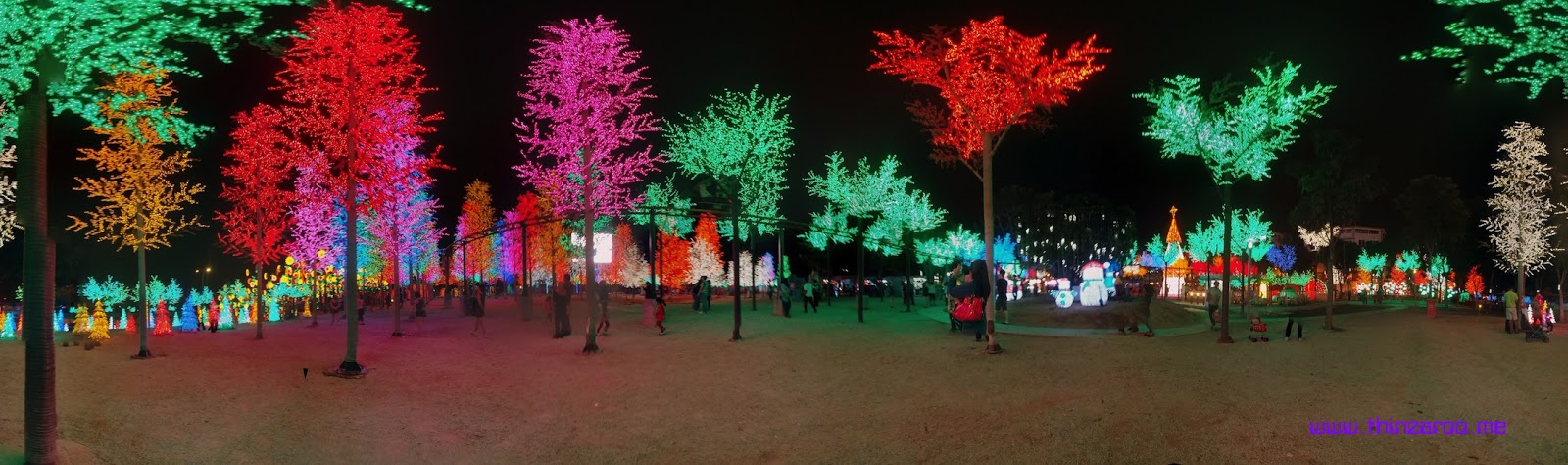
 Shah Alam I-city က LED wonderland (ဒီတစ်ပုံ သေချာကြည့်ရင် ခြေပြတ်တွေရော ခေါင်းပြတ်တွေရော ပါတယ်။ :D)
အပေါ်ကပုံလို ၃၆၀ဒီဂရီ ပြည့်အောင် ရိုက်ထားမယ်ဆိုရင် "apply tiny Planet" ဆိုပြီး ခုလို အဝိုင်းဖြစ်အောင် လုပ်လို့ရသေးတယ်။ အလယ်က ဝိုင်းမနေတာကတော့ ၃၆၀ ဒီဂရီပြည့်ဖို့ နည်းနည်းလိုသွားလို့။ ကျန်တဲ့ပုံတွေကတော့ တစ်ပိုင်းတစ်စဘဲ ရိုက်ထားတာမို့ tiny Planet လုပ်လို့မရဘူး။ 


New features in Android 4.2 (Jelly Bean)

ဒီနေ့မနက်ဘဲ Galaxy Nexus အတွက် Android 4.2 update ရတယ်။ update စပေးတာ တစ်ပါတ်လောက်ရှိပြီဆိုပေမယ့် takju version တွေကို အရင်ပေးတော့ yakju က ဒီနေ့မှရတယ်။ Android 4.2 ကို Key Lime Pie လို့ နာမည်ပြောင်းမယ်ထင်တာ မပြောင်းဘူး။ Jelly Bean လို့ဘဲ ဆက်ခေါ်တယ်။ ICS (4.0.4) နဲ့ Jelly Bean (4.1.1, 4.1.2) ကြားမှာတုန်းက (ထောပါတ်သုတ်တာကလွဲရင်) ဘာမှ သိပ်ထူးထူးခြားခြား update မလုပ်လိုက်လို့ဖြစ်မယ်။ :D 4.2 မှာတော့ feature အသစ်တွေ အများကြီးပါလာတယ်။ အဓိက update ကတော့ photo sphere နဲ့ gesture typing တွေပါ။

၁။ Jelly Bean ရဲ့ codename က project butter ဆိုတဲ့အတိုင်း သိသိသာသာကို ချောမွေ့မြန်ဆန်လာတယ်။

၂။ Camera Controls - လူအများစုဟာ စမတ်ဖုန်းကို ဓါတ်ပုံရိုက်ပြီး အင်တာနက်မှာ ရှဲဖို့အတွက် အဓိက သုံးတယ်လို့ သုတေသီတွေက ဆိုတဲ့အတွက် Android team ကလည်း Camera app ကို စပါယ်ရှယ်ပြင်ရေးပုံရပါတယ်။ feature တွေ အသစ်တွေ အများကြီး တိုးလာတယ်။ ဓါတ်ပုံရိုက်နေရင်း လက်နှစ်ချောင်းနဲ့ pinch လုပ်ပြီး zoom in/out လုပ်လို့ရလာတယ်။ ညာဘက်အောက်နားက အဝိုင်းလေးကို tap လုပ်ပြီး settings, white balance, flash တွေ အလွယ်တကူ ပြောင်းလို့ရလာတယ်။ Android 4.0.1 မှာ panaroma capture ပါလာပြီး အခု Android 4.2 မှာ Photo Sphere ကို စတင်မိတ်ဆက်လာတယ်။


၃။ Photo Sphere mode ကိုသုံးပြီး ဖုန်းကင်မရာနဲ့ Google Street View လိုမျိုး ၃၆၀ ဒီဂရီ ရိုက်လို့ရတယ်လို့ ဆိုပါတယ်။ Photo Sphere နဲ့အတူ အဲဒီ ၃၆၀ဒီဂရီကို လှည့်ကြည့်လို့ရတယ့် Gallery feature ကို Google+ မှာ တပြိုင်တည်း release လုပ်တာ တွေ့ရတယ်။ (အခုရုံးမှာဆိုတော့ မစမ်းကြည့်ရသေးဘူး။ နောက်ရက်မှ သေချာစမ်းကြည့်ရမယ်။) သူများတွေရိုက်ထားတဲ့ပုံတွေတော့ တော်တော်မိုက်တယ်။
photo sphere collection 
Photo Sphere နဲ့ရိုက်တဲ့ပုံတွေကို JPEG format နဲ့သိမ်းပြီး ပုံနဲ့ပါတ်သက်တဲ့ အခြား information တွေကို open XML metadata အနေနဲ့ ပုံမှာ တွဲလျက် save လုပ်ထားတယ်လို့ဆိုတာကတော့ စိတ်ဝင်စားဖို့ ကောင်းပါတယ်။ Google+ မှာတင်လို့ရမယ်။ အီးမေးလ်ပို့လို့ရမယ်။ Facebook ကရော photo sphere ကို support လုပ်လာမလားဆိုတာ စောင့်ကြည့်ရပါမယ်။ 


 ၄။ Photo filter - Instragram တို့လိုမျိုး Gallery ကနေ ဓါတ်ပုံတွေ တိုက်ရိုက် edit လုပ်လို့ရလာပါပြီ။ သိပ်တော့ မစုံဘူး။ Gallery ကနေ ဓါတ်ပုံကြည့်ရင်း ပထမဆုံးပုံမှာ ဘယ်ဘက်ကို swipe လိုက်ရင် ကင်မရာကို ပြန်ဖွင့်ပေးတယ်။ 


၅။ Gesture typing - စာတစ်လုံးချင်း ရိုက်စရာမလိုဘဲ Swype လိုမျိုး ဆွဲဆွဲပြီး စာရိုက်သွားလို့ရတဲ့ function ကီးဘုတ်အသစ်မှာ ပါလာတယ်။ Swype ထက်အများကြီး smooth ပိုဖြစ်တယ်။ စာရိုက်ရတာ ပိုအဆင်ပြေလာတယ်။ 


၆။ Font - မြန်မာစာ အရင် ဇော်ဂျီ ဖောင့် embed လုပ်ထားတဲ့ webview app က မြန်မာစာတွေ မမြင်ရတော့ဘူး။ native app ကတော့ ကောင်းကောင်း အလုပ်လုပ်သေးတယ်။ 1st Myanmar Browser လည်း မြန်မာစာ မမြင်ရတော့ပြန်ဘူး။ Arabic unicode ကိုတော့ 4.1 မှာစပြီး fully-support လုပ်တာ တွေ့ရတယ်။ မြန်မာယူနီကုဒ်ကိုတော့ ဘယ်ခါ full-support လုပ်မလဲ မသိ။ (အခုက partially support လုပ်ထားတော့ ဇော်ဂျီကိုလည်း ကောင်းကောင်းဖတ်မရတော့ဘူး။ ယူနီကုဒ်လည်း အပြည့်အဝ ဖတ်မရသေးဘူး။)


၇။ Lock screen Widgets - Screen ကို unlock မလုပ်ဘဲ ဘယ်ဘက်ကို swipe လိုက်ရင် ကင်မရာဖွင့်ပေးပြီးတော့ ညာဘက်ကို ဆွဲရင် calendar/clock/gmail/messaging တစ်ခုခု ချက်ချင်းဖွင့်လို့ရအောင် configure လုပ်လို့ရလာတယ်။ တွေ့သမျှ မလွတ်တမ်း ဓါတ်ပုံရိုက်ယူထားလို့ရအောင်နေမယ်။ :D


၈။ Developer Options - Android 4.2 မှာ ဂူဂယ်က Developer Options ကို hide လုပ်ထားပါတယ်။ USB debugging ရှာမတွေ့လို့ လန့်သွားတယ်။ နောက်မှ နည်းတွေ့ပါတယ်။ Setting->About phone ကိုသွားပါ။ အောက်ဆုံးထိ scroll လုပ်ပါ။ Build number ကိုတွေ့ရင် ၇ကြိမ်တိတိ tap လုပ်ပေးမှ ဖုန်းဟာ developer ဖုန်းဖြစ်သွားပြီး Developer Options ပြန်ပေါ်လာပါမယ်။
ref: http://howto.cnet.com/8301-11310_39-57549207-285/restore-the-developer-options-menu-in-android-4.2/


၉။ Jelly Bean Easter egg - Settings->About phone ကနေ Android version ကို ဆက်တိုက် tap လုပ်ပေးရင် Android ဗားရှင်းထဲမှာ ဖွက်ထားတဲ့ Easter ထွက်လာတယ်ဆိုလို့ tap ကြည့်ရသေးတယ်။ Android 2.3 (Gingerbread) ကတည်းကစပြီး Easter egg တွေ ထည့်ထားတယ်ဆိုပေမယ့် ခုမှ သတိထားမိတယ်။ Android 4.2 မှာကြတော့ Jelly Bean Easter Egg လေးထွက်လာရင် ၅စက္ကန့်လောက် ဆက်ဖိထားရင် နောက်ထပ် bean တွေအများကြီး ထပ်ထွက်လာတယ်။ Beanflinger လို့ခေါ်တယ်တဲ့။ 

၁၀။ Daydream - Settings ထဲက Display အောက်မှာ Daydream ဆိုတဲ့ feature အသစ် ပါလာတယ်။ ကွန်ပျူတာ screen saver လိုမျိုး။ 

၁၁။ Multi-user login on tablets: tablet ကို လူအများကြီး ရှဲသုံးလို့ရပြီလို့ ဆိုတယ်။ ဖုန်းတွေမှာ မပါဘဲ tablet မှာဘဲ ပါတဲ့အတွက် စမ်းကြည့်လို့ မရတော့ ဘယ်လိုလည်း သေချာမသိ။  
၁၂။ December bug - Contacts add လုပ်တဲ့အခါ မွေးနေ့တို့ anniversary တို့ ထည့်မယ်ဆို December ပျောက်နေတယ်။ ဘယ်ကဘယ်လိုများ ဒီဇင်ဘာ တစ်လလုံး ချန်ခဲ့ရသလဲ မသိဘူး။ အဲဒီအတွက် နောက် update မကြာခင်တော့ ထုတ်ရဦးမယ်နေမယ်။  သူငယ်ချင်းတစ်ယောက်ပြောတာတော့ ဒီဇင်ဘာ၂၁ မှာ ကမ္ဘာမပျက်ဘူးဆိုမှ bug fix ထုတ်ပေးမလားမသိဘူးတဲ့။ :D 
(**update: December bug solved in 4.2.1 update)

Android ဗားရှင်းအသစ် release လုပ်တိုင်း အရင်ဆုံးရတဲ့အတွက်တော့ Nexus ဖုန်း ဝယ်ထားရတာ တော်တော်တန်သွားတယ်။ LG ရဲ့ Nexus 4 လိုချင်တာ ခုဖုန်းကလည်း တော်တော်ကောင်းနေသေးတယ်။ နောက်ထပ် Nexus အသစ်ထွက်မှဘဲ လဲတော့မယ်။ 

Ref:
- http://www.android.com/whatsnew/ 
- What’s New in Android 4.2 Jelly Bean (Wired.com)